
How to Connect a New Ad Platform to Leo
Leo works by connecting to your existing ad platforms and syncing your campaigns, ad sets, and ads into one unified view. Connecting a platform takes about 30 seconds — you authorize Leo via OAuth, and your data starts syncing automatically. This guide walks through the process for each supported platform.
Supported Platforms
Leo currently supports:
- Meta (Facebook & Instagram)
- Google Ads
- TikTok
- Google Analytics
- Google Search Console
Google Ads, LinkedIn, Reddit, and Google Search Console are marked as Beta — they’re fully functional, but you may see new features added over time.
How to Connect a Platform
From the Sidebar
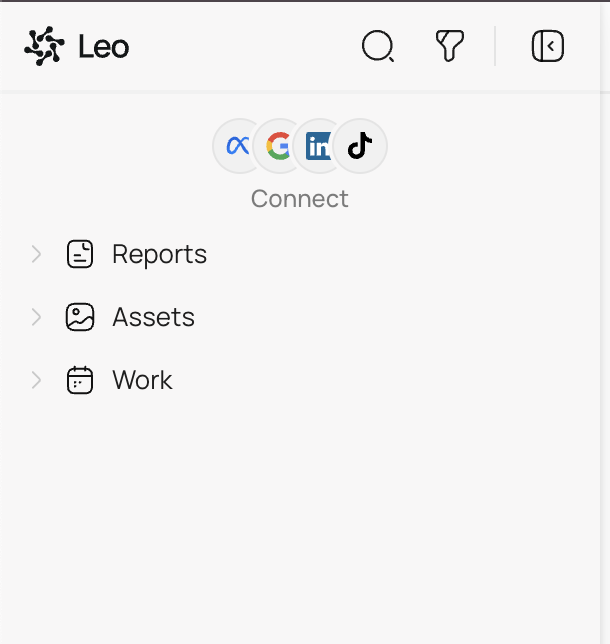
If you haven’t connected any platforms yet, you’ll see platform icons at the top of the left sidebar with a Connect link underneath. Click it to go directly to the connections page.
From Settings
You can also connect platforms at any time from Settings → Connections. Click your profile name in the bottom-left corner of the sidebar, then select Connections from the settings menu.
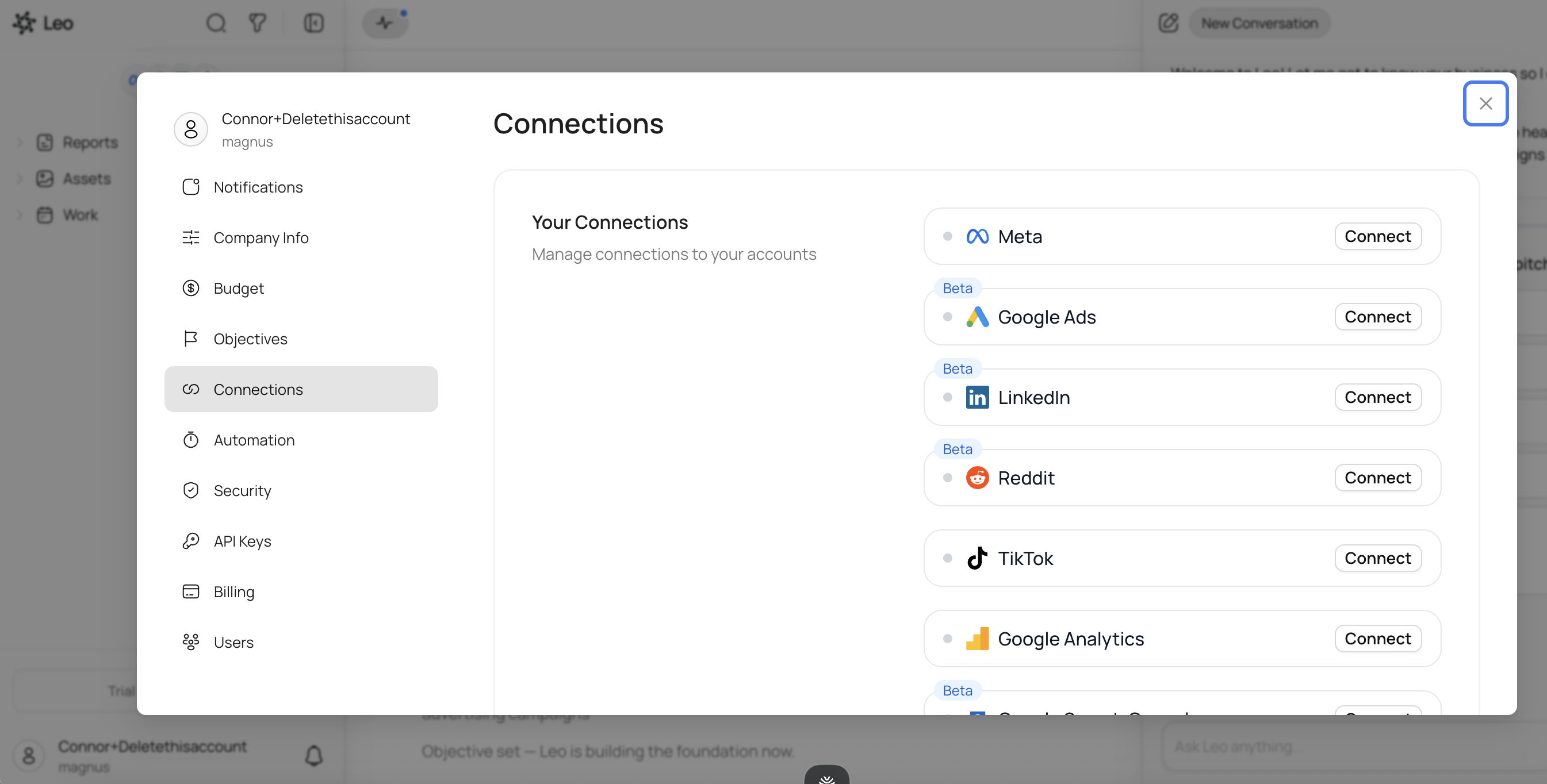
You’ll see each platform listed with a Connect button. Click the one you want to connect.
The Connection Process
For every platform, the process is the same:
- Click Connect next to the platform name
- Log in to your account on that platform (Meta, Google, etc.)
- Authorize Leo to access your ad account data
- Select the ad account you want to connect (if you manage multiple accounts)
- Done — Leo begins syncing your campaigns
The OAuth flow is handled entirely by the platform itself — Leo never sees or stores your login credentials. You’re granting Leo read and write access to your ad account through the platform’s official authorization system.
What Happens After You Connect
Once a platform is connected:
- Campaigns sync automatically. Your campaigns, ad sets, ad groups, and individual ads appear in the sidebar within a few minutes. Larger accounts with many campaigns may take a bit longer.
- Metrics start flowing. Spend, impressions, clicks, CTR, ROAS, and other performance data populate in Leo’s detail views.
- Leo can take action. With a connected platform, Leo can create new campaigns, pause or resume ads, adjust budgets, and make other changes — always with your approval first.
Platform-Specific Notes
Meta (Facebook & Instagram)
- You need admin or advertiser access on the Meta Business Manager that owns the ad account.
- Connecting Meta gives Leo access to both Facebook and Instagram campaigns.
- If you manage multiple ad accounts under one Business Manager, you’ll choose which one to connect.
Google Ads
- You need admin or standard access on the Google Ads account.
- If you use a Google Ads Manager (MCC) account, you can select which child account to connect.
- You need Campaign Manager access on the LinkedIn account.
- LinkedIn campaigns, campaign groups, and creatives will sync into Leo.
TikTok
- You need admin access on the TikTok Ads Manager account.
- TikTok campaigns, ad groups, and ads sync into Leo.
- You need admin access on the Reddit Ads account.
- Reddit campaigns, ad groups, and ads sync into Leo.
Google Analytics & Google Search Console
- These are analytics-only connections — Leo uses them for reporting and insights but doesn’t modify anything in these platforms.
- Connecting Google Analytics gives Leo richer conversion data to reference when optimizing your ad campaigns.
Disconnecting a Platform
To disconnect a platform, go to Settings → Connections and click the connected platform. You’ll see an option to disconnect. This stops all syncing and removes the platform’s campaigns from your sidebar. Your data on the platform itself is not affected — Leo only removes its local copy.
Troubleshooting
“I don’t see the Connect button.” Make sure you’re on the Connections page in Settings. If you still don’t see it, try refreshing the page.
“The OAuth flow fails or times out.” This usually means there’s a permission issue on the platform side. Double-check that you have admin or advertiser access on the ad account. If you’re part of a team, your account admin may need to grant you the right role.
“My campaigns aren’t showing up after connecting.” Give it a few minutes — the initial sync can take time, especially for accounts with hundreds of campaigns. If nothing appears after 10 minutes, try disconnecting and reconnecting the platform.
“I want to connect a different ad account on the same platform.” Disconnect the current account first, then reconnect and select the new account during the OAuth flow.